—————————————————————————
CPU : Intel 노스우드(소켓 478) P4 2.4c
M/B : GIGABYTE GA-8IPE1000-G GT (Intel i865PE)
VGA : 파워 컬러 DeltaChrome S8 256MB DDR (SS8-D3L)
Sound : 훈테크 dsp24 Revolution 7.1 Theater
ODD : LG 16x CD-RW(gce-8160b)
—————————————————————————
열씸이 써왔던 Asus P4P800SE가 사망한 후 바꾸게 된 메인보드,,
바꾸고 보니 Asus보다 더 좋음,, 안정성, usb등등,,
P4P800의 고질적인 usb문제가 몇개월 넘게 나타나지도 않고 dsp24와의 pci충돌문제도
없는 것 같구 내장랜도 끊김이 적은 것 같구,,
글구 보니 쓰는내내 괴롭히던 모든 문제해결,, ㅡㅡ
다만 Intel I865칩셋에서 usb는 고질적인 문제인 것 같은데,, 컴터 바꾸기 전까지
살아남아 주기를,, ^^
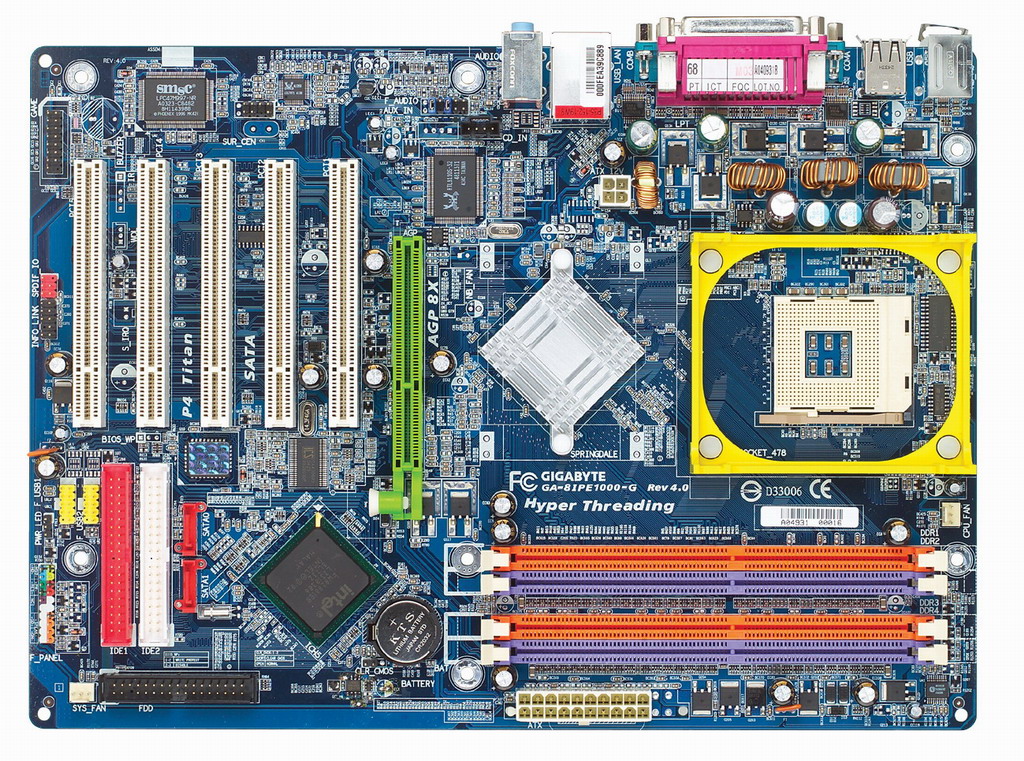
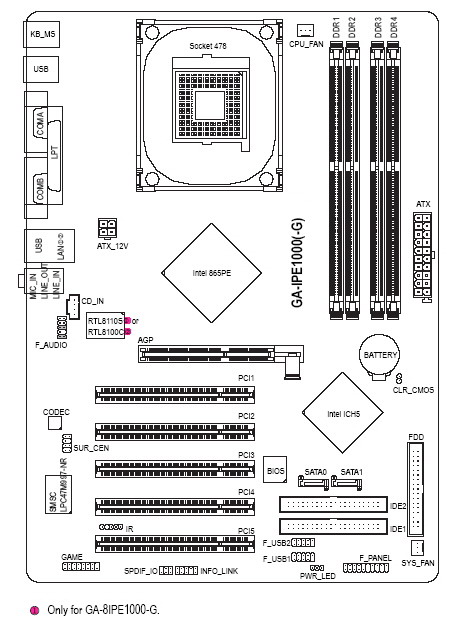
| I. 기가바이트 GA-8IPE1000-G GT (v4.0 / GbE) 상세 사양표 |
|
|
지원 CPU
|
ㆍNew FSB 800MHz 인텔 Pentium 4 (Micro FC-PGA2타입)
ㆍ소켓 478, 0.13㎛ Northwood / Prescott 지원
ㆍHyper Threading 기술 |
|
시스템 버스
|
ㆍ800 / 533 / 400 MHz FSB
|
|
시스템 칩셋
|
ㆍIntel 865PE HOST/AGP 컨트롤러
ㆍICH5 I/O 컨트롤러
ㆍI/O: SMSC LPC7M997-NR
|
|
메모리
|
ㆍ4 DIMM
ㆍ듀얼 채널 DDR 400/333/266
ㆍ최대 4GB 지원 (2.5V)
|
|
확장슬롯
|
ㆍ1 x AGP 8x / 4x (1.5v만 지원)
ㆍ5 x PCI (PCI 2.2 규격호환)
|
|
온-보드
IDE
|
ㆍ2 x ATA 100/66 Bus Master IDE
|
|
온-보드
S-ATA
|
ㆍ2 x S-ATA (ICH5)
ㆍ최대 150MB/s 대역폭
ㆍS-ATA HDD용 전원 케이블 제공
|
|
기가비트 Lan
|
ㆍ기가비트 랜 (10/100/1000 Mbit)
ㆍRealtek 8110S Chipset
|
|
UAJ
Audio
|
ㆍUniversal Audio Jack
ㆍ후방 사운드 포트 자동 인식 시스템
ㆍ8-CH 사운드 코덱 (Realtek ALC850)
ㆍ-> 2 Front / 2 Rear / 2 Surround Back / Center & Subwoofer
ㆍ기본 2-CH / 4-CH / 6-CH 스피커 시스템 구성가능
ㆍ8-CH 스피커 구성 및 S/P DIF Out 사용
ㆍ-> Surround Kit 별도구입 要 (고객센터 문의)
|
|
USB 2.0
|
ㆍICH5 을 통한 기본 6 x USB2.0 (최대8 x USB 2.0)
ㆍ4 By 리어 확장 브라켓
|
|
I/O 및 커넥터
|
ㆍ1 x FDD
ㆍ1 x LPT, 2 x COM 포트
ㆍ기본 6 x USB 2.0 (최대 8 x USB 2.0)
ㆍ1 x RJ45 LAN 포트 (기가비트 랜)
ㆍAudio (1 x Line-in / 1 x Line-out / 1 x MIC) 커넥터
ㆍPS/2 Keyboard & Mouse 커넥터
ㆍ1 x Game/Midi Header
ㆍ1 x Front Audio 커넥터
ㆍ1 x IrDA for IR/CIR
ㆍClear CMOS Jumper
|
|
Bios
|
ㆍ기가바이트 Single Bios 채용
ㆍAward Bios (2M bit x 1 FWH)
|
|
규격
|
ㆍATX, 4 layers PCB (30.5 x 22.0 cm)
|
소프트웨어
|
ㆍ한글화 Xpress Installation CD
ㆍNorton Internet Security 2002 (Firewall, Anti-virus, etc)
ㆍGIGABYTE Windows Utility Manager
ㆍAdobe Acrobat Reader
ㆍAdobe Acrobat e-Book Reader
ㆍIAA (Intel® Application Accelerator)
ㆍDirectX 9.0
|
| 부가 기능 |
ㆍPS/2 Keyboard Power on by Password
ㆍPS/2 Mouse Power on by Password
ㆍSuspend to RAM (STR)
ㆍWake on LAN (WOL)
ㆍUSB KB / MS wake up from S3
ㆍAC Recovery
ㆍClear CMOS Jumper
ㆍXpress Install
ㆍXpress Recovery
ㆍAnti-Burn
ㆍ@BIOS
ㆍQ-Flash
ㆍEasy Tune4
|
| OverClock |
ㆍCPU FSB / Voltage
ㆍAGP Voltage / Clock (PCI/AGP Fixed)
ㆍDIMM Voltage / Clock
|
|
 |
BIOS |
| Download |
Version |
Date |
Description |
| Download |
F5 |
2005/08/19 |
- Update CPU microcode
|
| Download |
F3 |
2005/05/17 |
- Adjust CPU temperature measurement accuracy for Prescott CPU
|
| Download |
F2 |
2005/01/31 |
- Support MIB feature for Easytune4/5
|
| Download |
F1 |
2004/12/29 |
- First release
- For PCB Rev. 4.x only
|
| * |
Please remember to “Load Optimize Defaults” (in the BIOS Setup) after updating new BIOS |
| * |
#1. If the file that you select does not exist, please try to download the file from country, Asia.
#2.If there are still missing files or file errors, please write to us (Technical Service Zone) about which products and which country that you had been selected.
#3.For better download quality, it is recommended to use the FTP software or download monitor shareware like Flashget, Getright…etc for reserving your treasure time and effort. |
|
|
Driver |
|
| Audio |
| Download |
Date |
Description |
Version |
Size |
| Download |
2006/06/06 |
Realtek AC97
O.S. : Windows 98,Windows Me,Windows 2000,Windows XP,Windows XP 64bit |
5.10.00.5940 |
30.34 MB |
|
| Chipset |
| Download |
Date |
Description |
Version |
Size |
|
| Download |
2004/11/12 |
Intel INF installation
O.S. : Windows 9x,Windows Me,Windows 2000,Windows XP,Windows Sever 2003 |
6.2.1.1001 |
2.47 MB |
|
| LAN |
| Download |
Date |
Description |
Version |
Size |
| Download |
2004/09/01 |
Realtek 81xx
O.S. : Windows 98,Windows Me,Windows NT,Windows 2000,Windows XP |
6.15 |
2.15 MB |
|
|
Manual |
| Download |
Language |
Revision |
File Format |
Size |
Note |
| Download |
Korea |
4001 |
pdf |
8.86 MB |
|